Cabinet Quoting Software: The Design Is Done, the Quote Is Ready
When the customer asks “how much?”, you don't open a spreadsheet. The quote comes from the panels of the cabinet you designed, at your prices; the render and the PDF come from the same project.
Why do cabinet quotes so often end up as a guess?
You've taken the measurements, the customer is waiting at home and asks: “How much?” In most shops the answer is a guess based on a price per linear metre. Then cutting starts, the sheet count goes up, the hinges and runners weren't in the sum, and the profit melts away.
CabinetWizard was built as cabinet quoting software that removes the guess. The quote is calculated from the panels you built: how many sheets, how many metres of edge band, how many hinges, how many runners. The cabinet quote comes out of the design itself.
What's on the quote screen?
As soon as the design is done, the total appears in the Quote step: materials, hardware, labour and profit, line by line. At the top is the grand total including VAT, with the sheet area, metres of edge band, sheet count and yield underneath.
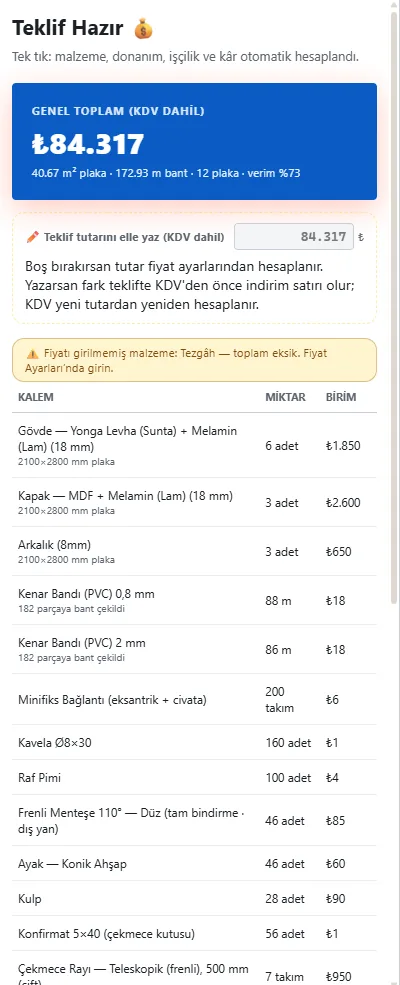
Below it, carcass board, door board, back panel, edge band in two thicknesses, connectors, shelf pins, hinges, legs, handles and drawer runners each sit on their own line with a quantity or length. Hinges get separate lines by arm type, runners by system and length. Glass doors and glass shelves are priced by the square metre, worktop and gola profile by the metre. If you haven't entered a price for an item, the screen warns you about a material with no price, so you know the total is incomplete.
Everything you add to the cabinet comes with its own line: LED strip, profile and driver take-off, sink, flap stay, push latch. You don't keep a separate hardware list and copy it into the quote by hand.
Your unit prices: Price Settings
Prices are entered by the shop. Price Settings work as a dynamic settings page: enter a unit price once and every quote is calculated from it.
- Sheets: a price per sheet for each board and finish combination; surface treatments such as lacquer or membrane go on a separate line by the square metre.
- Pricing mode: per part, per linear metre or per module. A shop that quotes by the linear metre works in that mode.
- Hardware: hinges, runners, handles and other lines; brand prices are edited separately.
- Labour and profit: added on top of the subtotal, with VAT calculated last. Column notching gets its own labour line too.
Boards of different thickness are listed on separate lines in the quote, so an 18 mm carcass and an 8 mm back never get mixed up.
What happens to the quote when the design changes?
The quote isn't a separate document, it's another view of the design. When the customer says “make this cabinet 80 instead of 60”, you change the size; panel sizes, sheet count, edge band metres and hardware quantities are recalculated, and the quote comes out of the same project again.
A concrete example: the customer wants the three-door wardrobe as a four-door with drawers at the bottom. You add a section and put in the drawers; the new side panel, shelves and doors go into the sheets, and the new hinges and runners into the hardware lines, by themselves. No going back to the calculator.
Doors work the same way: switching style among 386 door designs, or changing handle or finish, takes a few clicks and shows up in the lines. Move the doors to another material and they get their own material line in the cut list and the quote.
You still have the last word. Under the total card, type the figure you agreed on into “✏️ Type the quote total by hand (incl. VAT)”. The difference becomes a “Discount” or “Extra” line before VAT, and VAT is recalculated from the new total; items, labour and profit stay as they are. The figure is saved with the project. If the design or prices change later, the program warns you with “calculated X → Y” and never deletes your figure on its own; ↺ Back to calculated total undoes it.
Presenting to the customer: render, PDF and customer pack
A quote on its own is a number; what convinces the customer is usually the picture. The render engine is inside the program: press Render and, with no settings, you get an image ready for the customer. There's also a room render for kitchens, a 5-angle catalogue, dimensioned sheets and dimensioned renders.
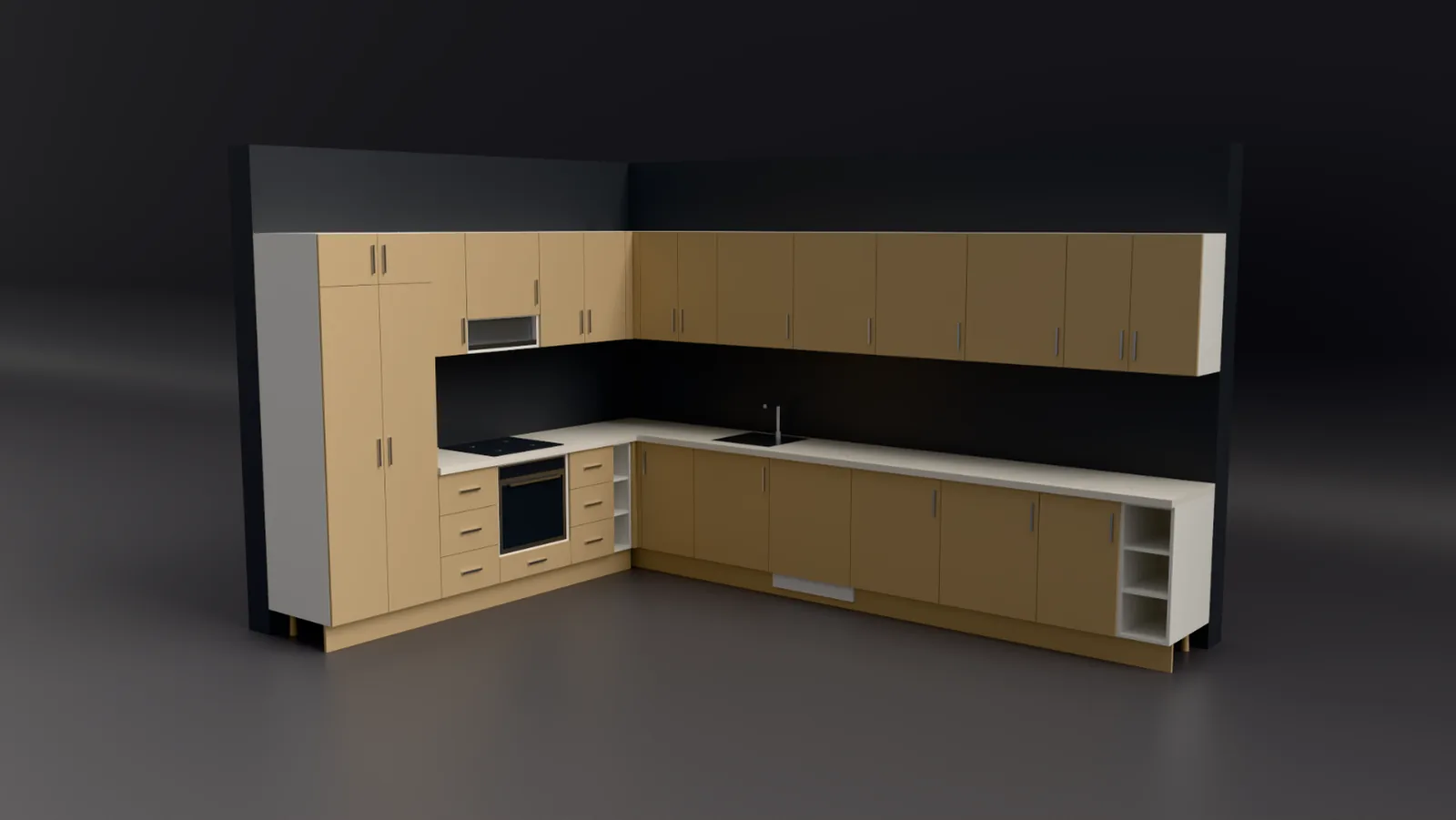
In the quote details you fill in the customer's name, quote details, validity period and your company details, and add your logo. Company and customer details are shared with the A4 dimensioned sheet, so you type them once. You print the quote as a PDF. The 📦 Customer pack puts the 3D view, the dimensioned drawing and the quote in one PDF; open it in WhatsApp and copy the message. Sitting with the customer, you can change a size and print the new quote right there.
Quote accepted: on to production
Once the quote is accepted you don't redraw anything; the automatic cut list, cutting plan, labels, NC and DXF come from the same project. For details see cut list software and CNC cabinet software. For kitchens there's kitchen design software, and for wardrobes and room cabinets wardrobe design software. The quote section of the home page has a summary.
FAQ
Can I use my own prices in the quoting software?
Yes. You enter the unit prices in Price Settings yourself, and choose per-part, per-linear-metre or per-module pricing.
Is cabinet quoting open in the demo?
No. In the free demo design, 3D, rendering and project saving are open; production outputs such as quotes, cut lists, NC and DXF are in the full version.
Can I give a discount on the quote?
Yes. Type the total by hand; the difference becomes a Discount line before VAT and appears on the printed quote too.
How much does the program itself cost?
The current price and launch terms are on the pricing page.